
WPSApp
Screenshots

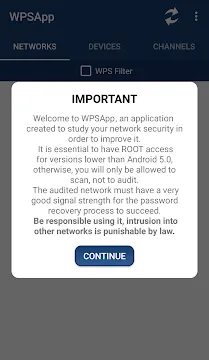
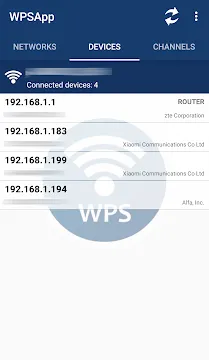

WPSApp is a powerful network tool. It checks the security of your Wi-Fi connections. Many people use this software to test their home routers.
The tool focuses on the Wi-Fi Protected Setup protocol. This protocol is often called WPS. It allows you to connect devices easily. However, this system can have severe security flaws. The tool helps you find these vulnerabilities quickly.
Security awareness is vital for everyone. Hackers can exploit open networks easily. Therefore, specialized security utilities are essential. They let you audit your own network security. You can see if your router is safe from attacks.
This guide will explain how WPSApp works. You will learn about its main features. We will also discuss network safety tips. Let us explore how to protect your connection.
What is WPSApp and How Does It Work?
The utility scans your surrounding network environment. It looks for nearby Wi-Fi access points. Then, WPSApp analyzes the security of these networks. It focuses mainly on the WPS protocol status.
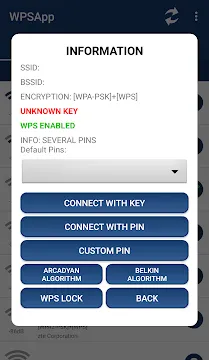
The tool uses specific algorithms to generate default PINs. Many routers use predictable PIN patterns. Consequently, the scanner tests these pins to see if the router responds. If the connection succeeds, your network is vulnerable.
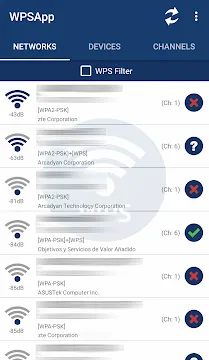
You will see a visual indicator for each network. A green checkmark means the network is vulnerable. A red cross means the network is secure. A yellow question mark means the protocol is enabled, but the PIN is unknown.
Thus, WPSApp acts as a diagnostic tool. It does not require deep technical knowledge. Anyone can use it to check their router status.
Key Features of the Utility for Network Auditing
This tool offers several useful features for users. First, WPSApp provides a clear interface. You can see all nearby networks instantly. The layout is simple and clean.
Second, the scanner displays detailed network information. You can see the MAC address. You can also see the signal strength and the network channel. This data helps you optimize your router placement.
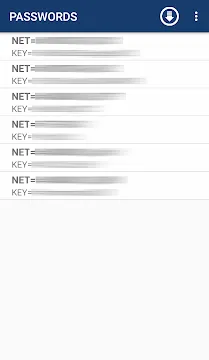
Third, the program includes a password recovery feature. This feature requires root permissions on older systems. It shows you saved Wi-Fi passwords on your device.
- Real-time scanning: The interface updates the network list constantly.
- PIN generator: It calculates potential default PINs for many router brands.
- Signal meter: The utility measures network strength in decibels.
These features make the tool a great utility. You can manage your wireless security efficiently.
How to Use WPSApp Safely and Legally
You must use security tools responsibly. Network testing can raise legal questions. Therefore, you should only test networks that you own. Do not use WPSApp on your neighbor’s Wi-Fi.
Testing unauthorized networks is illegal in many places. You must respect the privacy of others. Use the scanner strictly for educational purposes. Use it to secure your own home network.
If the tool accesses your router easily, you must take action. You should log into your router settings immediately. Then, turn off the WPS feature completely. This step secures your network from outside intruders.
Safety always comes first in cybersecurity. Software like WPSApp highlights weak spots. Then, you can fix those weak spots before someone else exploits them.
Understanding WPS Vulnerabilities via WPSApp
The WPS protocol was designed for convenience. It helps users connect devices without long passwords. However, this convenience creates significant security risks. The tool demonstrates these risks clearly.
The main issue lies in the eight-digit PIN system. The router validates the first four digits separately. This flaw reduces the total number of combinations. A hacker can crack the PIN very quickly.
WPSApp automates this testing process. It saves you time during network audits. You can see how fast an attacker might breach your defense.
- PIN brute-forcing: Attackers guess combinations until they succeed.
- Default PIN risks: Many manufacturers use weak default PINs.
- Lack of rate limiting: Some old routers do not lock out repetitive wrong guesses.
The software helps you identify these exact weaknesses. Knowledge is your best defense against cyber threats.
Benefits of Regular Network Scans with WPSApp
Regular network audits keep your data safe. New vulnerabilities emerge constantly. Therefore, you should use WPSApp periodically to check your status.
Sometimes, router firmware updates reset your settings. Your disabled WPS might turn back on automatically. The scanner helps you catch these changes early. You can maintain a strong security posture over time.
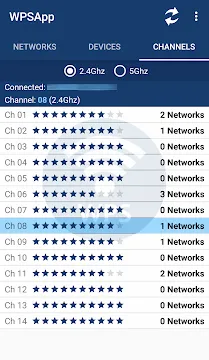
Additionally, the program helps you find the best Wi-Fi channels. Crowded channels slow down your internet speed. The interface shows you which channels are free. You can switch your router to a less crowded channel.
As a result, your internet performance improves. Your connection also becomes much more stable. The tool serves multiple purposes for home users.
Troubleshooting Common Issues in the Tool
Users sometimes face issues while using the software. For example, the tool might not find any networks. If this happens, check your location permissions. It requires location data to scan for Wi-Fi.
Another common issue involves password viewing. You might not see saved passwords. This feature often requires specific system privileges. Newer systems restrict this access for safety reasons.
Sometimes, the scanner cannot connect to a vulnerable router. This situation occurs when the router enables a temporary lock. Many modern routers lock themselves after several failed PIN attempts.
- Restart your device Wi-Fi connection.
- Move closer to the wireless router.
- Wait for the router lock period to expire.
- Check for updates to the software.
These steps solve most technical problems. You can then resume your network security audit.
Conclusion
WPSApp is an excellent tool for network security analysis. It helps you identify critical flaws in your wireless router. The tool uses automated PIN testing to check your defense levels.
However, you must use it ethically. Only scan networks that belong to you. If you find a vulnerability, disable WPS in your router settings immediately. This action keeps your personal data safe from hackers.
Regular scanning ensures long-term protection. The software makes this process simple and fast for everyone. Download it today to take control of your wireless security.